Friday, June 26, 2009

Fixing a heat gun better than before

This heat gun was destined for disaster! Followed by a simple fix; I'm not a huge fan of fixes that require machinist skills. Partly because I don't have the skills or equipment but, also, I'd rather share simple fixes that anyone can implement so that more stuff is diverted from destination Dump.


I bought this über-fancy Craftsman heat gun a few years ago for heat shrink tubing since using a cigarette lighter was a really sucky tool for the job of applying heat. And of course, I couldn't possibly get the low end heat gun like my wife did for her crafts. No, I had to get the heavy duty version. It even says INDUSTRIAL on the side, so it must be good! (It is at this point that we roll our eyes...)
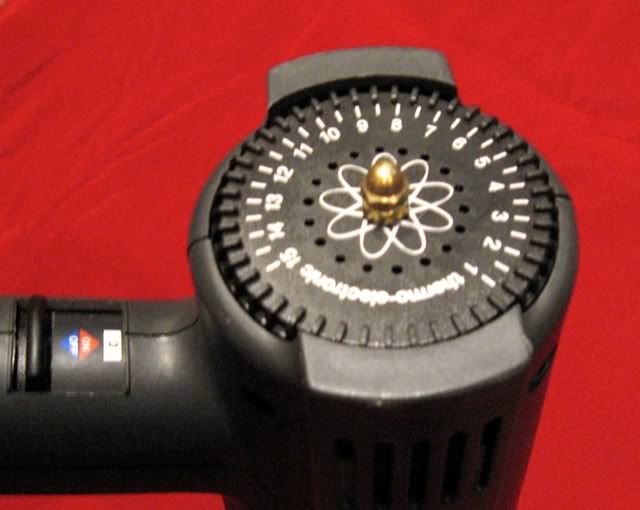
After a couple months, I dropped it and the heat control dial ceased functioning properly. It felt like something broke off inside. That really sucks for a $110 heat gun.

I could've lived with it stuck at one (wrong) heat setting. Or, I could've opened it up and set the internal potentiometer to a more usable setting but left it non-adjustable. Or I could've simply glued the broken bits together to restore it to original condition. But what fun would that be??

I suppose most people, faced with an expensive, broken heat gun, wouldn't have thrown it out at this point. Maybe they would've had it repaired, or ordered replacement parts, I don't know. That isn't really the point. By not only fixing it, but making it better than it was before, there's a good guarantee the thing will last a long time and stay out of the trash and give the owner their money's worth out of it. So hopefully I'll inspire you to seek to fix and improve your broken widgets and wingdings.

Sometimes stuff we buy isn't engineered very well, and this heat gun's temp dial was a great example. The large flat disc was molded with a spindly little shaft coming out that engaged with the potentiometer. When I dropped the heat gun, that shaft snapped clean off because it had no real reinforcement at it's base. Chances are, Sears sells replacement parts but I'd wager they'd be just as prone to break.
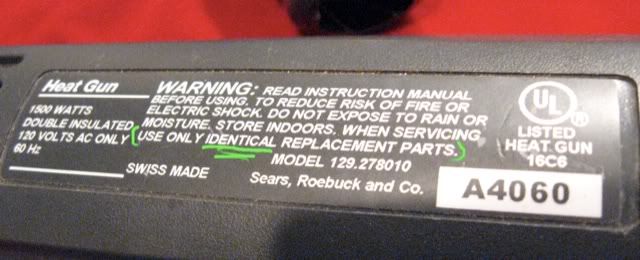
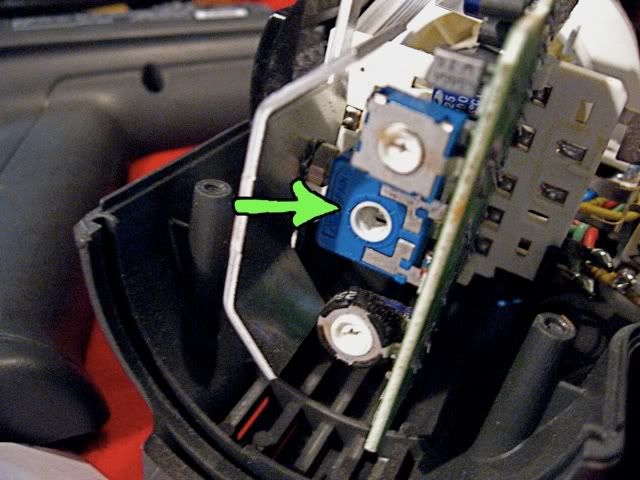
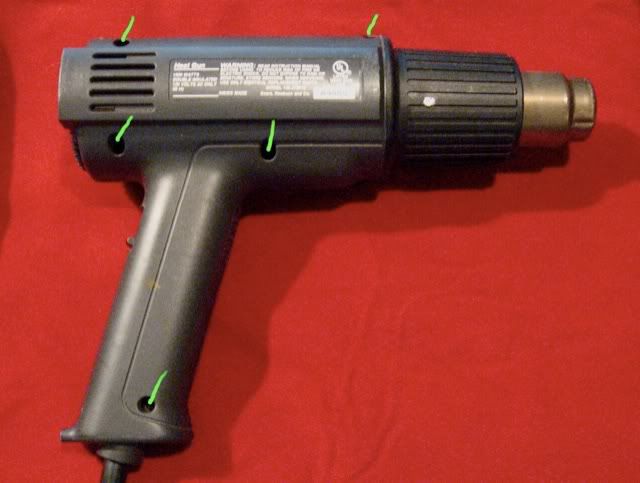
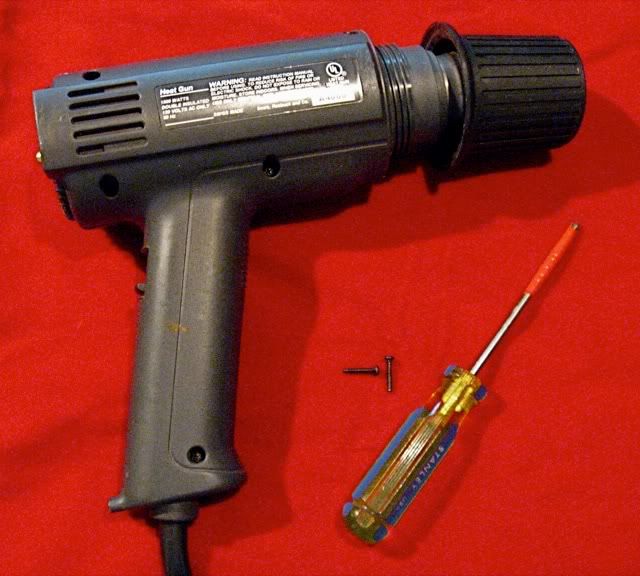
So I took it apart. There are a few screws on one side that come out with a Phillips screwdriver. Easy enough. You have to unscrew the heat shield before you can separate the halves of the heat gun. Once you do pull it apart you see some electronics, a little motor to drive the fan, the heat dial, and some other goodies. What I originally found was the broken shaft (I could hear it rattling in there before I took the thing apart).
The shaft had parallel flats on the end where it engaged the potentiometer.

So instead of gluing the plastic shaft back in place, I decided to use a piece of threaded brass rod clamped to the dial with brass nuts. I chose brass because it is very easy to work with. I'd need to file down the flats and cut it to length. Brass is sufficiently sturdy and is kind of cool looking too.

I drilled a hole through the center of the dial, cut the brass rod to approximate length, then filed the flats by hand to fit into the potentiometer. Then assembled the dial, rod, nuts.

Then I put the dial back in place in the housing to test fit rod length. After adjusting for length using the nuts, I cut off the exposed end just long enough to put a fancy brass cap nut on it so it looks nice and holds the outer nut in place. A lock washer on the inside nut would've been a great idea. I've been using it for a couple years since the fix, it continues to work beautifully, and I am confident it'll hold up to all sorts of abuse.

Food for thought: another option would've been to use JB Weld or plastic compatible epoxy to reattach the shaft and also add reinforcement at the base. I like the brass better, but that's just me.

Monday, June 22, 2009

Stock up fasteners!


Here's a tip I learned from Dad that's really helped me out. Hoard fasteners and oddball plastic and rubber things that may be useful some day. :)

Stock up lots of fasteners! When you don't have to always go to the hardware store to fix something, it sure is a nice time saver! When I need a bolt or nut, especially the small ones, I buy lots of them.

I have a fairly good stock of #8 machine screws (A) in a couple lengths with nuts and lock washers. I use these all the time for myriad fabrication and repair projects.

I stock up on drywall screws--they're good for simple wood fastening, home repair, hanging art, and more. I also save lots of small screws (B) which come in handy when doing computer and electronics repair. For auto repair I tend to save every bolt and nut I can (C) because you never know when you need one. This is especially helpful for lug nuts. And I tend to like to save all the wood screws I come across (D).

As for the hoarding of oddball things... particularly rubber and plastic items (E) seem to come in handy all the time.

Thursday, June 18, 2009

Don't Toss that Turntable

Do you still have your old records? Is your old turntable broken in a closet? Why not enjoy those nostalgic tunes again like so many other people lately?

Sounds like a job for you, The Fixer!

I remember all too well when CDs were new and within a few years, vinyl records were declared dead. Well, record sales never completely stopped. Now CD sales are declining while record sales, though small, continue to grow! After all, the ritual of playing records is way more fun and rewarding than pressing play on your iPod or CD player.

For right now, let's focus on a simple fix for your belt drive turntables. It turns on but the platter spins too slow or takes to long to spin up. Easy to fix! Just replace the belt.

You can still get new belts for old turntables from several reputable sites online (see below). That's what I did for my old JVC AL-A1 and for a recently acquired BIC 980 (pictured upper right; recognize the album, anyone?). You can still get new styluses and cartridges. And there's quite a few selections to choose from, too!

To replace the belt, follow these simple steps for most belt drive turntables. You might want to check vinylengine.com --register for free and get a free service manual for your turntable, if available.
  • First, remove the turntable mat. Next, lift the platter up off of the spindle and the belt should come loose. If you can't remove the platter, consult the service manual
  • Place the new belt around the belt drive surface on the platter. Some platters may have a convenient place to temporarily clip the belt so it'll drop over the motor pulley, otherwise, hold as best as you can.
  • Place the platter back onto the spindle and manually spin it until one of the access holes permits a good view and access to the motor pulley.
  • Place the belt over the motor pulley.
  • Replace the mat
You may want to replace that old stylus with a new one to prevent (further) damage to your records. I'll list a few of my favorite sites to get cartridges, stylii and all these other parts.

If the (semi-) automatic mechanism on your turntable is broken that is quite a bit more complex to fix, but it is doable. You can get help on the AudioKarma forum among others. Generally speaking, most automatic turntables need their mechanisms fully disassembled and cleaned and lubricated. That is how I got my BIC 980 to work perfectly once again.

Lastly, to get rid of those pops and crackles on old records, well... I'll save that for another article so I can do that topic justice.

Company
LPGear.com
NeedleDoctor.com
TurntableExperts.com
www.garage-a-records.com
VinylEngine.com
SoundStage Direct
Records-by-Mail
AudioKarma forum
Products
Cartridges, stylii, belts, record care
Parts for your Dual, Garrard or BIC
Various turntable parts
Free manuals for turntable, protractors
Great mail order record store for new records
Here's a great place to get used records!
Friendly helpful folks on The Best vintage audio forum

Wednesday, June 17, 2009

Stereo light burned out? Easy fix!

Sometimes the backlighting on an older stereo receiver display will burn out. You can send it to Goodwill but then what kind of green fixit superhero would you be? Instead, you can easily replace the lamp and get years' more service. You can even try an improvement to increase the life of the bulb.

Assuming you have some very basic electronics safety and repair skills, this should be pretty straightforward. You'll need a screwdriver, soldering iron (and soldering skills), flux, electronics solder, possibly some small wire, a multimeter, and a wire cutter and stripper.

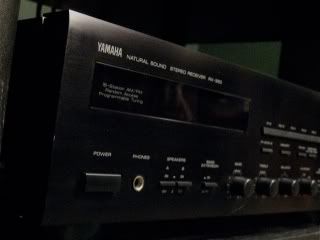
A couple months ago I was in the Goodwill again looking for vintage audio equipment, one of my (myriad) hobbies and spied an early 90's Yamaha stereo receiver that was marked as broken, as is, and priced cheap. So I thought I'd test it.

I connected some of the ubiquitous cheapo speakers nearby, turned the volume all the way down, and plugged it into the wall. When it powered up, the speaker protection circuit relays went "click" indicating all's well. (Most halfway decent receivers have protection circuits). When I turned up the volume, lo and behold I got sound.

The display was blank and black, however. I bought it, took it home, and pulled the cover and remove the mini "grain of wheat" bulb from the display housing. It was was silvery-black -- burned out. These small bulbs are available from a variety of sources like Radio Shack, Tower Hobbies, and one of my favorite electronics stores, All Electronics. They come in several voltages and some machines use wedge bulbs or other bulb types and you can typically get these too. If not you can find somethng close in size.

Next step was to power off, unplug, and clip the lamp off, strip the leads in the stereo. Use multimeter to measure voltage across the lamp wire (without letting them touch!). Use mini clips (see pic) to clip to the stripped leads, then plug in and power up with hands outside of the stereo. Measure for both DC and AC voltage. Then find a lamp that matches the voltage you read. It doesn't matter if it is AC or DC because the incandescent lamp won't care.

Next step is to solder in the lamp. If you get a lamp that comes with longish wire leads it is easier. If the wire leads aren't insulated it might be wise to put shrinkwrap over them and shrinkwrap over the base of the bulb. With the bulb connectted and hands away from the stereo's guts, power up and make sure it lights. If so, unplug, power off, reinstall the bulb, and replace the cover and you're done.

For the advanced types, if you find the voltage on the leads for the bulb is at or above the voltage rating on the lamp, you could install a small resistor inline with the bulb which will reduce voltage. It'll be dimmer, but hopefully run a little cooler and last longer than the original.

When I finished up with the Yamaha I enjoyed it for several days. It was really an excellent stereo, good imaging, soundstage, and that Natural Sound that Yamaha was known for which offers a high degree of timbral realism! Huh? Look, it sounded good, ok? :)

I then sold it to a nice fellow for a few bucks more than I paid, so he ended up with a deal, I ended up with a little money for my hobbies, and the machine will no doubt serve him well for years to come. I didn't manage to get a picture of the unit after the fix so you'll just have to trust me.

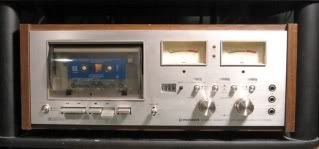
I also performed the same fix on an old Technics receiver I've had laying around, as well as an old Pioneer CT-F8282 cassette tape deck. I really love simple fixes!

Friday, June 12, 2009

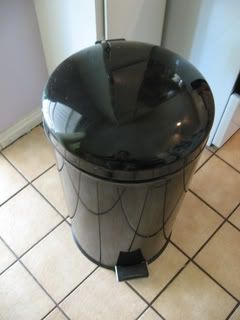
Don't trash your trash can, fix it!

We have one of those trash cans with the flip lid that you activate with a foot pedal. Ours failed and I think this is a fairly common problem with these cheap step cans.

The design is pretty poor, like so many things these days, meant to cut costs to the bare minimum (gee, thanks Carnegie), longevity be damned. (Or in some cases I should say, "obsolescence be planned")

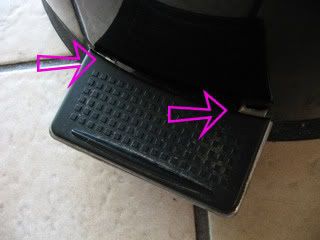
First, the lid is heavy and there isn't a lot of mechanical leverage to lift it. A rod is actuated by the foot pedal and always required a lot of force to open the lid. It always annoyed me. The foot pedal is attached to the can body with metal tabs. Over time with all the forces involved, these tabs bend loose and the foot pedal comes loose.

So do we trash the trash can? Well, obviously not, judging by the kind of blog this is. So how did I fix this one? I gained a few months by fixing the bent metal tabs on the foot pedal. After a second failure, I had to come up with something more permanent.

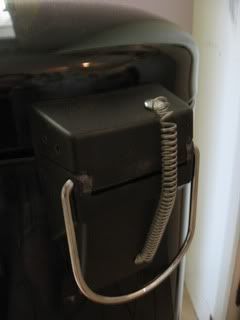
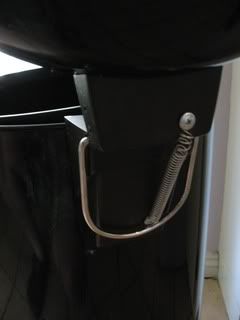
With the main issue being the forces required to open the lid, I decided to try and use a spring to aid in the lifting of the lid. I got a pack of springs from HarborFreight a few years ago and they are always coming in handy.

I did a little guesstimating and playing around with the mechanism and decided on a couple of mounting points on the of the lid hinge. I didn't get it right the first time, but eventually I got the spring to where the lid will lift -- and also stay up -- with a fairly light pedal press. Then I fixed the pedal tabs again, hopefully for the last time (if not, I'll try something sturdier).


A little more creativity could be applied to camoflague the bright chrome spring. Flexible paint? Wrap in a heat shrink tube? Any ideas?

About

Fix the useless to use less. Fix more, trash less, use less.

I like fixing things that break. It's something my dad taught my growing up because he is always fixing things. But, at least in the U.S., we live in a time and place where most of the time, broken stuff gets pitched in the trash.

Lately I've had a nagging feeling that I should be using my fixit skillz to live a greener lifestyle and encourage others to do the same. So I put together this blog to provide tips on living a greener lifestyle by fixing stuff. I'm convinced you can save some money doing this, too.

Maybe you're already mechanically inclined. Perhaps you even fix stuff all the time. I hope I can inspire you to set aside the time to save useful objects from going to the landfill. If you're new to fixing things maybe I can share some tips that will help you out.

Thursday, June 11, 2009

Contact Me

I would love to hear your feedback!

Your Name
Your Email
Subject
Message
Image Verification
Please enter the text from the image
[ Refresh Image ] [ What's This? ]